View Pallets - Browse Pallet Database (continued)
 Totals
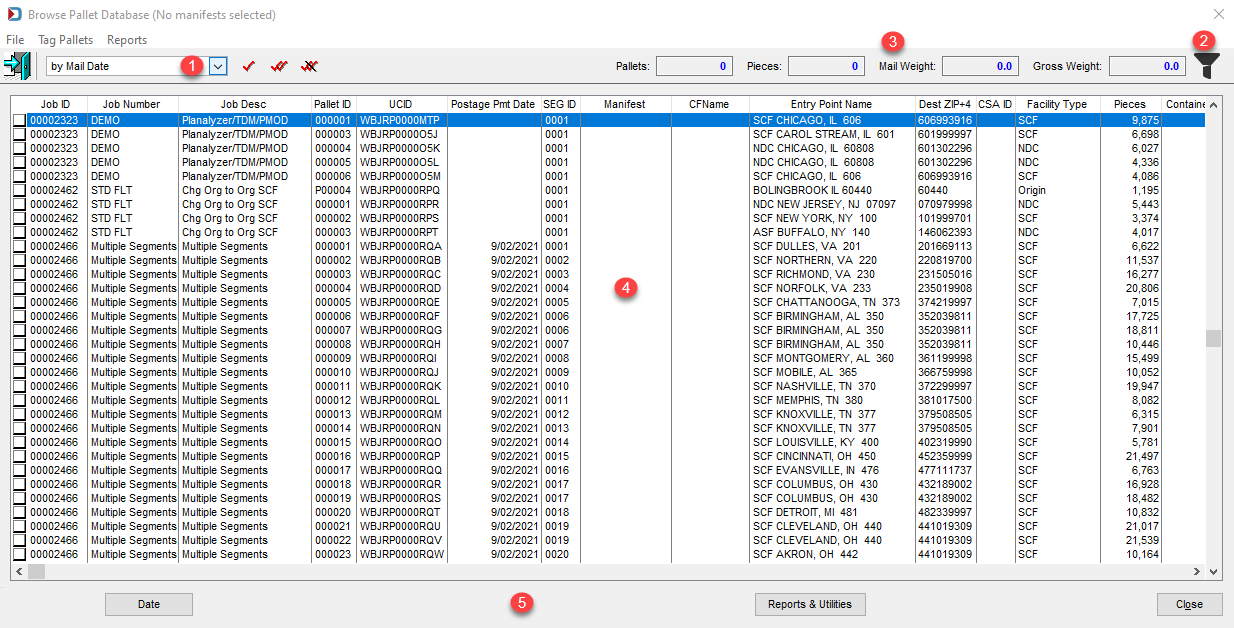
As pallets are selected, the number of pallets selected, the total number of pieces, the total mail weight, and the total gross weight are calculated; the results are displayed in the corresponding fields at the top of the screen.

 Pallet List
The pallet list provides the following data for each pallet:
Job ID: The system generated DAT-MAIL Job ID or the presort's Job ID, which becomes the Historical Job ID on import.
If you select the Parsed by Historical Job ID option in Program Setup > Logistics Tab, you will see the Historical Job ID.
Job Number: Your internal job number assigned during presort or revised in DAT-MAIL.
Job Desc: This is a description of the job set in presort or revised in DAT-MAIL.
Pallet ID: Display container ID of the pallet, this is assigned during presort, but this can be revised in DAT-MAIL.
UCID IUser Container ID): Is a combination of your ULC and a serial number that its barcode is sometimes printed on the pallet depending on the logistics provider; some presort will assign this ID.
Postage Pmt Date: This is the Postage Statement Mailing Date in the job.
SEG ID (Segment ID): Sometimes, the pallet display container IDs are duplicated when there are multiple segments. This ID helps distinguish one group of pallets from another.
Manifest: This is the manifest number for users of MCTM.
CFName (Consolidation Facility Name): This is the logistics provider's facility where the mail will be dropped for users of MCTM.
Entry Point Name: The USPS Facility where mail will be dropped, it will show the facility type, city, state, and labeling list zip, for example, SCF Boston, MA 021
Dest ZIP+4 (Destination Zip+4): The USPS facility's delivery address 9-digit zip.
CSA ID: The USPS Customer Supplier Agreement assigned ID.
Facility Type: The facility where the mail is drop shipping - NDC, SCF, etc.
Pieces: The total pieces on the pallet.
Containers: The number of trays or sacks, if a mother pallet. If a regular pallet, it will show zero (0).
Mail Weight: The net weight of the pallet.
Gross Weight: The net weight plus the tare of the pallet, also trays or sacks tare weights if a mother pallet.
Mail Date: This is both the field Actual Container Ship Date and Postage Statement Mailing Date.
Drop Date: Scheduled Induction Start Date or in MCTM Earliest Drop Date
In-Home Date: Scheduled In-Home Date or in MCTM In-Home Date From
Action: Whether anything processing occurred in MCTM with the pallet. Since they are not used in View Pallets, we will not describe them here.
Location: This is a field updated by wbSCAN.
Postage Rlse Date This is the DSMS release date for LSC users.
Rlse Time (Release Time): This is the DSMS release time for LSC users.
DM Job ID: This is the system generated DAT-MAIL Job ID.
IM Barcode: Pallet's Intelligent Mail Barcode
Carrier: The logistics company or carrier used to ship pallets. MCTM users populate this field.
Error: This is for DIME users only.
The Browse Pallet Database screen is resizeable, eliminating the need for scrolling left/right to view the various columns of data.
 Buttons
The button bar at the bottom of the screen contains the following functions:
-
Dates: To be used to update date information for selected (checked) pallets. If a date(s) is changed, it will also be changed/updated in the corresponding Mail.dat file(s). However, if postage has already been paid, PostalOne! will not receive these date changes. For more information, refer to View Pallets - Update Dates.
-
Reports & Utilities: To be used for generating the "Trailer Pallet Report". In addition, pallet data can be exported and imported, as well (refer to View Pallets - Pallet Report and View Pallets - Export & Importfor more information and instructions).
-
Close: To be used to close/exit the Browse Pallets Database screen.
Continue View Pallets - Update Dates